Booking page
Services, staff and live time slots on a simple form that works on a phone.
Online Booking & Reminders
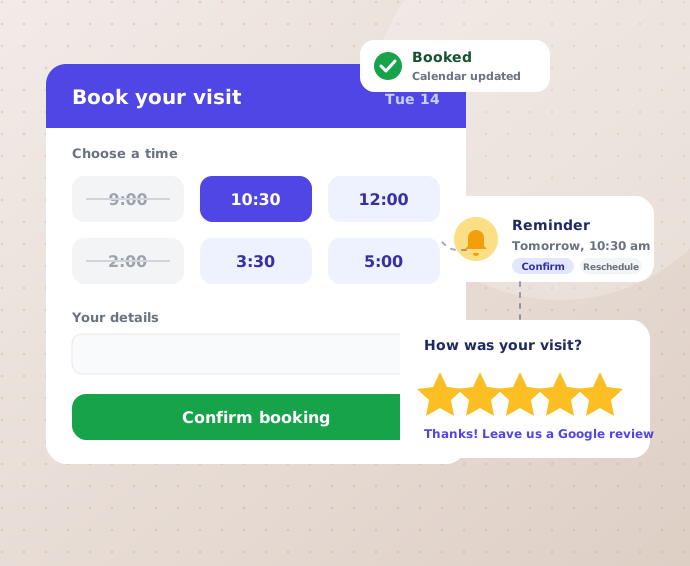
A booking page on your website where customers pick a free time, get reminders and leave a review afterwards. Fewer phone calls, fewer no-shows.
What’s included
One system for the booking, the reminder and the thank-you. Everything is listed before we start.
Get a free demo ↗Services, staff and live time slots on a simple form that works on a phone.
Bookings appear in your Google Calendar, and taken times disappear from the page.
Customer and owner both get a confirmation by email or WhatsApp.
Customers change their own booking, so you stop playing phone tag.
Email, SMS or WhatsApp reminders about 24 hours and 2 hours before the visit.
Customers answer a reminder in one tap, and you see who is coming.
Ask for a deposit to hold a slot, which helps against no-shows.
After the visit, a thank-you with your Google review link. Unhappy feedback comes to you privately.
See today’s bookings and your customers, and change timings, holidays and rates yourself.
Who it’s for
Salons, clinics, dentists, gyms, tutors and local service businesses all use the same simple idea.
Not sure it fits your business? Tell us how you take bookings today. We will say honestly whether it helps.
A working booking page with your services and timings, ready for you to test.
Your services, timings, staff and how you want to take payment, if at all.
See our work ↗How we work
Three simple steps, and nothing to sign before you have seen the plan.
We learn your services, timings, staff and how customers book today.
Your booking page and reminders go on a private link for you to try.
We launch it, watch the first bookings and adjust the reminders.
Questions
Yes. Bookings are added to your Google Calendar, and times you have blocked stop showing as free.
Yes, if you want it. An advance deposit is optional and can be set per service.
Email, SMS or WhatsApp. We agree the channel and the timing with you before we start.
Usually, yes. The booking page can be added to your current site or built into a new one.
Yes. The owner dashboard lets you change timings, holidays and rates without calling us.
Connected services
Your next step
Tell us how you take bookings today. You get a clear plan and a quote before anything is built.